

Overview
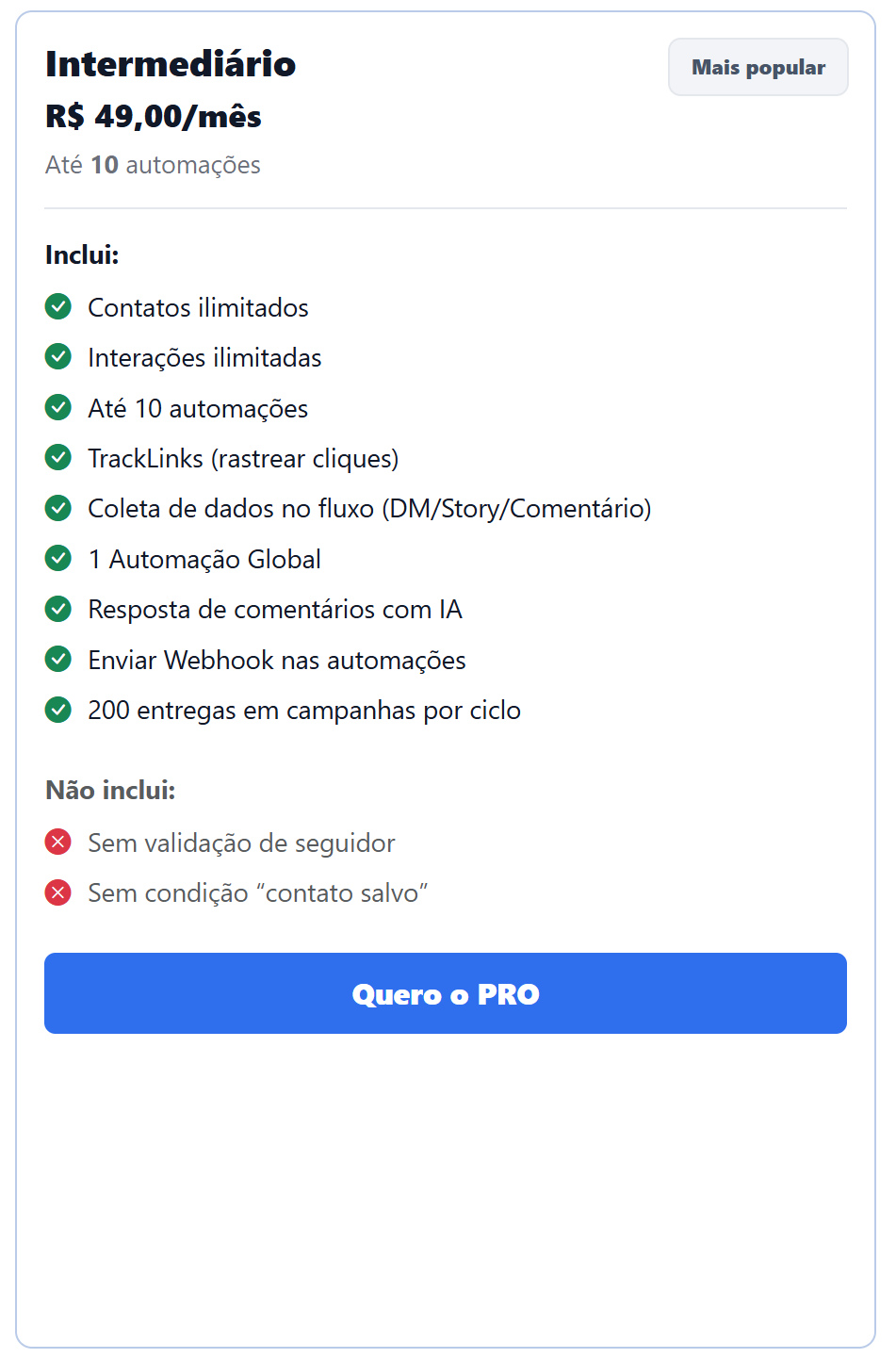
The InfluenciMax PRO Plan is designed for users who want to go beyond basic Instagram automations and start working with more flows, data collection, result tracking, and artificial intelligence features.
With the PRO Plan, you can create up to 10 automations, collect contact information during flows, and track clicks through TrackLinks.
Video tutorial
Before you start
Before using the PRO Plan features, make sure your Instagram account is correctly connected to InfluenciMax.
It is also important to consider the limit of up to 10 automations when organizing your flows. You can use them for different purposes, such as replies to comments, Stories, Direct Messages, and other strategies available on the platform.
What is included in the PRO Plan
- unlimited contacts;
- unlimited interactions;
- up to 10 automations;
- TrackLinks for click tracking;
- in-flow data collection, including interactions through DMs, Stories, and comments;
- 1 Global Automation;
- AI-powered comment replies.
Step by step
- Create your automations. Go to the Automations area and create the flows required for your strategy. Since the PRO Plan allows up to 10 automations, you can organize different flows according to each objective.
- Use data collection. During an automated conversation, you can request user information such as name, email address, or phone number. The collected data is associated with the contact in the platform and can be used later in your flows and strategies.
- Track results with TrackLinks. TrackLinks allow you to monitor clicks on links sent by automations. This helps you identify which links are receiving interactions and better monitor the performance of your flows.
- Configure the Global Automation. The PRO Plan allows 1 Global Automation. This type of automation can be used to configure an experience that works more broadly across the account without depending exclusively on a specific post or campaign.
- Use AI-powered comment replies. The PRO Plan also includes AI-powered comment replies. AI can help generate automatic replies to comments received on posts, reducing the need to answer each interaction manually.
Features not available in the PRO Plan
Some more advanced features are not included in the PRO Plan.
- follower validation;
- the advanced “saved contact” condition.
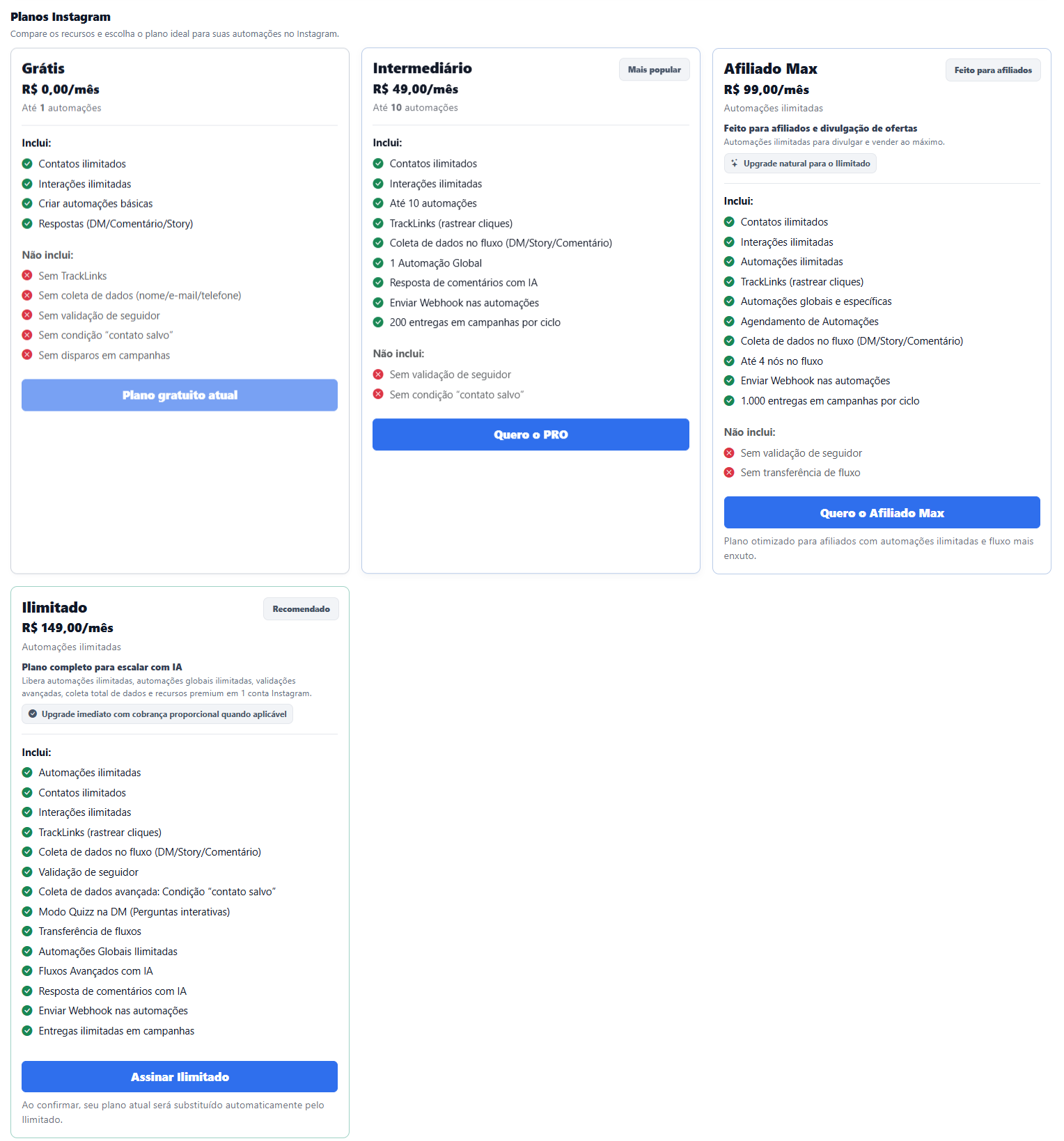
If your strategy depends on these features, review the other available plans to identify the option that supports the resources you need.
How to view or change your plan
To check your current plan or compare available resources, go to the Settings area of your account and review the plan information.
The current Instagram plan structure is: Free → PRO → Affiliate Max → Unlimited.
Screenshots
The screenshots have been placed next to the corresponding sections: the first shows the PRO Plan and the second shows the comparison between the available plans.
If something does not work
I cannot create new automations
Check whether you have already reached the PRO Plan limit of 10 automations. If the limit has been reached, you will need to reorganize your automations or use a plan with greater capacity.
Contact data is not being saved
Review the configuration of the block responsible for data collection and confirm that the requested field has been configured correctly in the flow.
Clicks do not appear in TrackLinks
Confirm that the link used in the flow was configured as a TrackLink and review the settings before running another test.
AI is not replying to comments
Review the configuration of the AI feature used in the flow and make sure the required integration is correctly configured in the account.
Expected result
With the PRO Plan configured correctly, you can use up to 10 automations, keep unlimited contacts and interactions, collect data during flows, track clicks with TrackLinks, use one Global Automation, and automate comment replies with AI.