

Overview
The Multi-Agent and Permissions feature in InfluenciMax allows Master accounts to invite other users to participate in platform operations without sharing the same login.
With this structure, different team members can use InfluenciMax according to their responsibilities. The Master account can control which modules each user can access and define different permissions for different Instagram accounts.
This makes it possible to organize teams with multiple agents, separate responsibilities, and remove access when necessary without deleting the user's InfluenciMax account.
Video tutorial
Before you start
Before inviting new users, define who needs to participate in the operation and which areas of the platform each person should access.
The Master account is responsible for managing invitations, permissions, and scopes for additional users.
Also consider which Instagram accounts each team member should access, since scopes can be configured differently for each profile.
Step by step
Inviting a new user
The Master account can invite additional users to participate in the InfluenciMax operation.
The invitation can be sent by email. It is also possible to generate an invitation link to make access easier for the new team member.
If the user already has an InfluenciMax account, they can accept the invitation using their existing account.
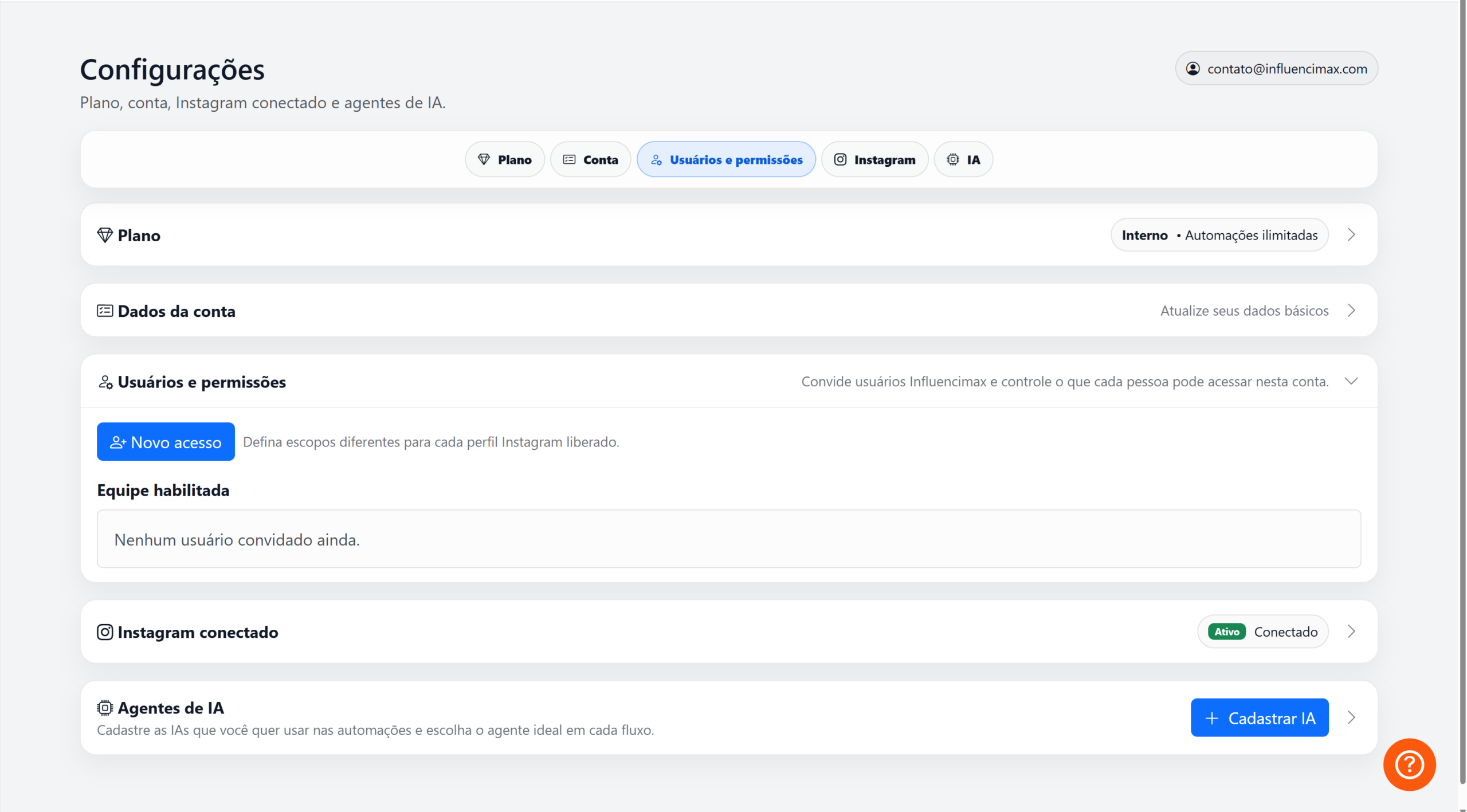
Invite new users to participate in your InfluenciMax account operation. Completing invited-user onboarding
Invited users have a specific onboarding process.
They do not need to immediately connect an Instagram account to begin participating in the operation they were invited to.
This allows new team members to enter the team structure using the access granted by the Master account.
Defining permissions by module
After adding a user, the Master account can determine which InfluenciMax modules will be available to them.
Available or organized scopes include:
- Dashboard;
- Instagram Accounts;
- Support;
- Contacts;
- Automations;
- Settings;
- Users and permissions;
- Plan and billing.
Each team member can therefore receive only the access required for their activities.
For example, a support agent can receive access to operational areas without necessarily receiving access to plan and billing settings.
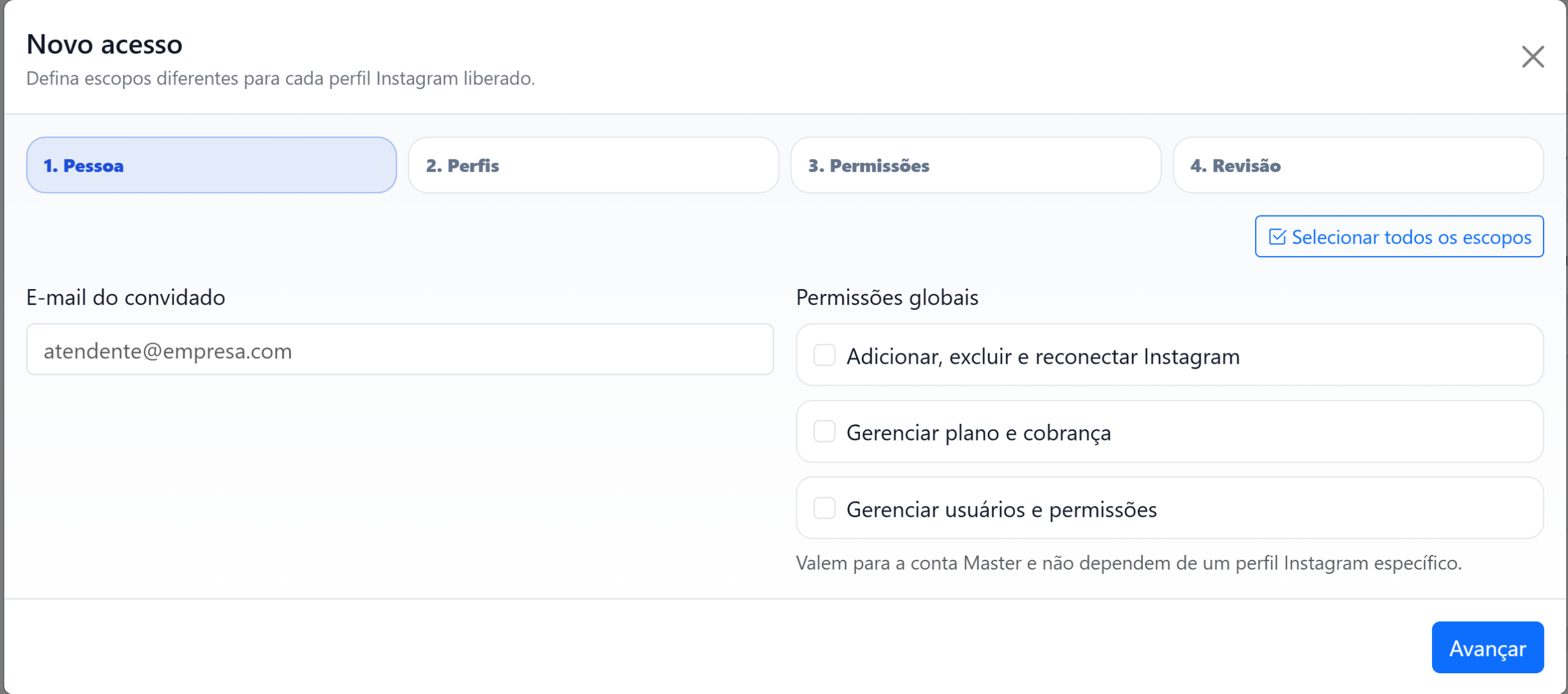
Define which InfluenciMax modules and permissions will be available to each user. Defining access for different Instagram accounts
In addition to module permissions, different scopes can be used for different Instagram accounts.
This is especially useful for operations that manage multiple profiles.
The Master account can determine which accounts each member can access, separating the team according to the profiles each person is responsible for.
Working with users who also have a Master account
A user invited to participate in an operation can also have their own Master account in InfluenciMax.
Access received through an invitation does not prevent that user from maintaining their own structure and connecting their own profiles.
The different types of access can coexist.
Revoking a user's access
When a team member no longer needs to participate in an operation, the Master account can revoke their access.
This does not require deleting the user's InfluenciMax account.
Only the access granted to the operation is removed, preserving the user's own account.
Tracking actions performed by users
Actions performed by invited users can be recorded internally by the platform.
These records help maintain a history of team activity and make operations easier to track.
How Multi-Agent and Permissions work together
The Multi-Agent structure adds different people to the operation, while permissions determine what each person can access.
A Master account can build a team with different responsibilities and distribute access according to each member's role.
Instagram account scopes complement this organization by defining not only what a user can access, but also which accounts they can work with.
Screenshots
The screenshots for this article have been inserted directly into the corresponding steps above.
If something does not work
The user did not receive or could not use the invitation
Confirm that the invitation was sent to the correct email address or generate the invitation link again.
If the user already has an account, make sure they are using the corresponding account to accept access.
The user cannot access a specific module
Check the permissions assigned to the user and confirm that the corresponding module is enabled.
The user can access a module but not an Instagram account
Review the scopes configured for that user and confirm that the desired Instagram account is included in the permitted access.
A user whose access was revoked still has an InfluenciMax account
This is expected. Revoking access removes access to the Master account's operation but does not delete the user's InfluenciMax account.
Expected result
After configuring Multi-Agent and Permissions, the Master account can invite other users to participate in the operation and control access according to each member's responsibilities.
It is possible to define permissions by module, establish different scopes for Instagram accounts, revoke access when necessary, and allow invited users to keep their own InfluenciMax accounts independently.
Teams with multiple members can work in the same operation with a clearer division of users, accounts, and permissions.