

Overview
The Story Reply automation lets you start a flow when someone replies to a Story published by your Instagram account.
In InfluenciMax, you can define which replies should start the automation and then continue the interaction through Direct Messages using the actions configured in the flow.
This feature helps organize replies received on Stories and automatically direct contacts to messages, links, or other automation steps.
Video tutorial
There is currently no video tutorial available for this article.
Before you start
- Your Instagram account must be correctly connected to InfluenciMax.
- You must have access to the Automations area.
- The Story used in the strategy must be available when the setup depends on a specific Story.
- Define in advance which replies or keywords should start the flow.
Step by step
- Create a new automation. Go to the InfluenciMax Automations area and start creating a new Instagram automation.
- Select Story Reply. In the initial flow setup, choose Story Reply as the trigger. This trigger starts the automation when someone replies to the Story according to the configured conditions.
- Define which Stories the automation will work with. Configure which Stories can start the automation when a reply is received. Based on the available options, define the Story to be used or the desired behavior for incoming replies.
- Configure the keywords. Define the keywords that should be identified in replies. For example, if the Story asks the person to reply “I WANT IT,” that phrase can be used as a condition to start the flow.
- Configure negative keywords. When necessary, use negative keywords to control replies that should not follow the same automation condition. This helps define more precisely which interactions can start the flow.
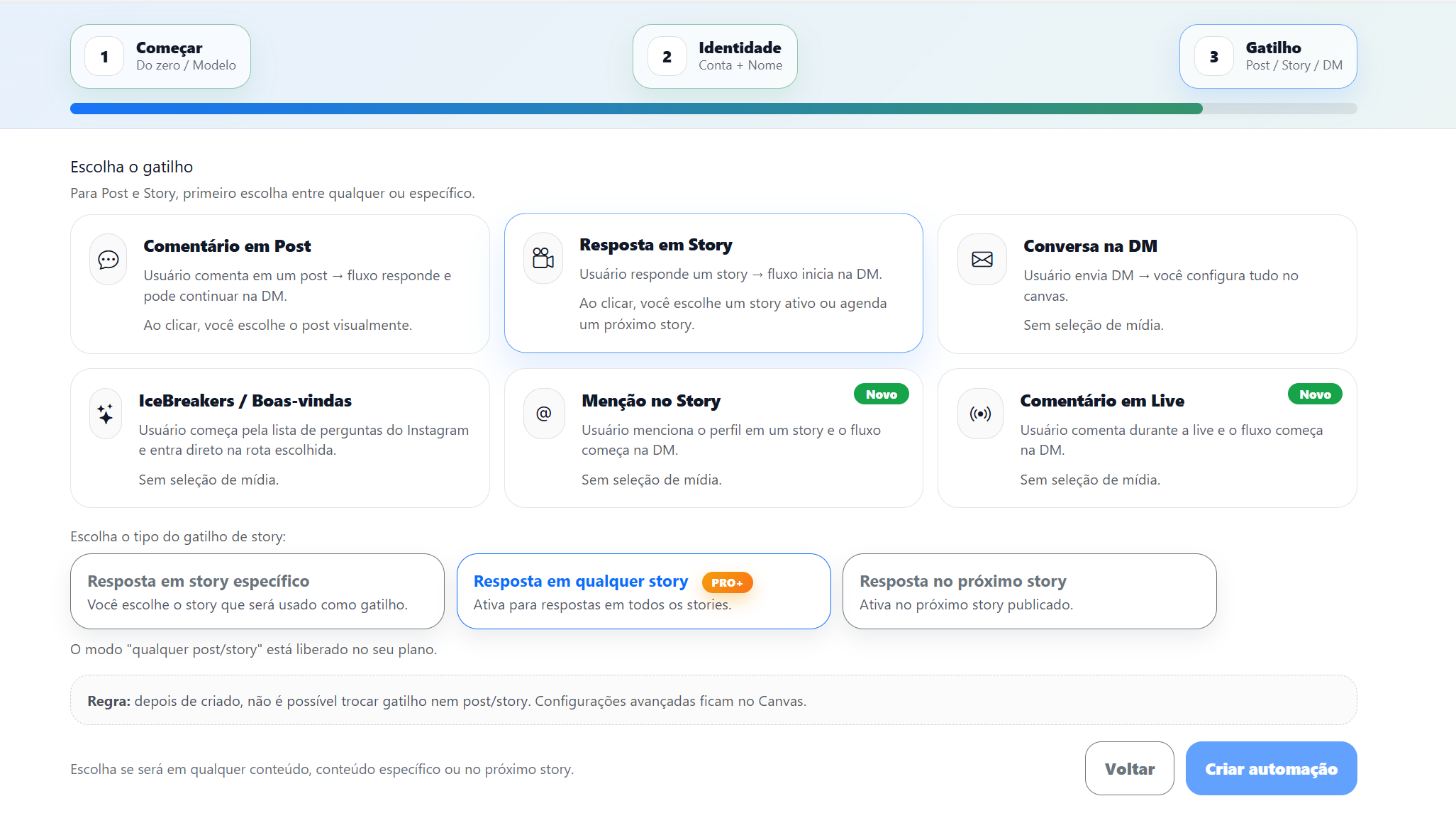
- Configure the Direct Message. After configuring the Story Reply trigger, add the next automation action. You can configure a message to continue the conversation through Direct Messages and include the information required for the journey. The message will be sent according to the conditions defined at the beginning of the flow.
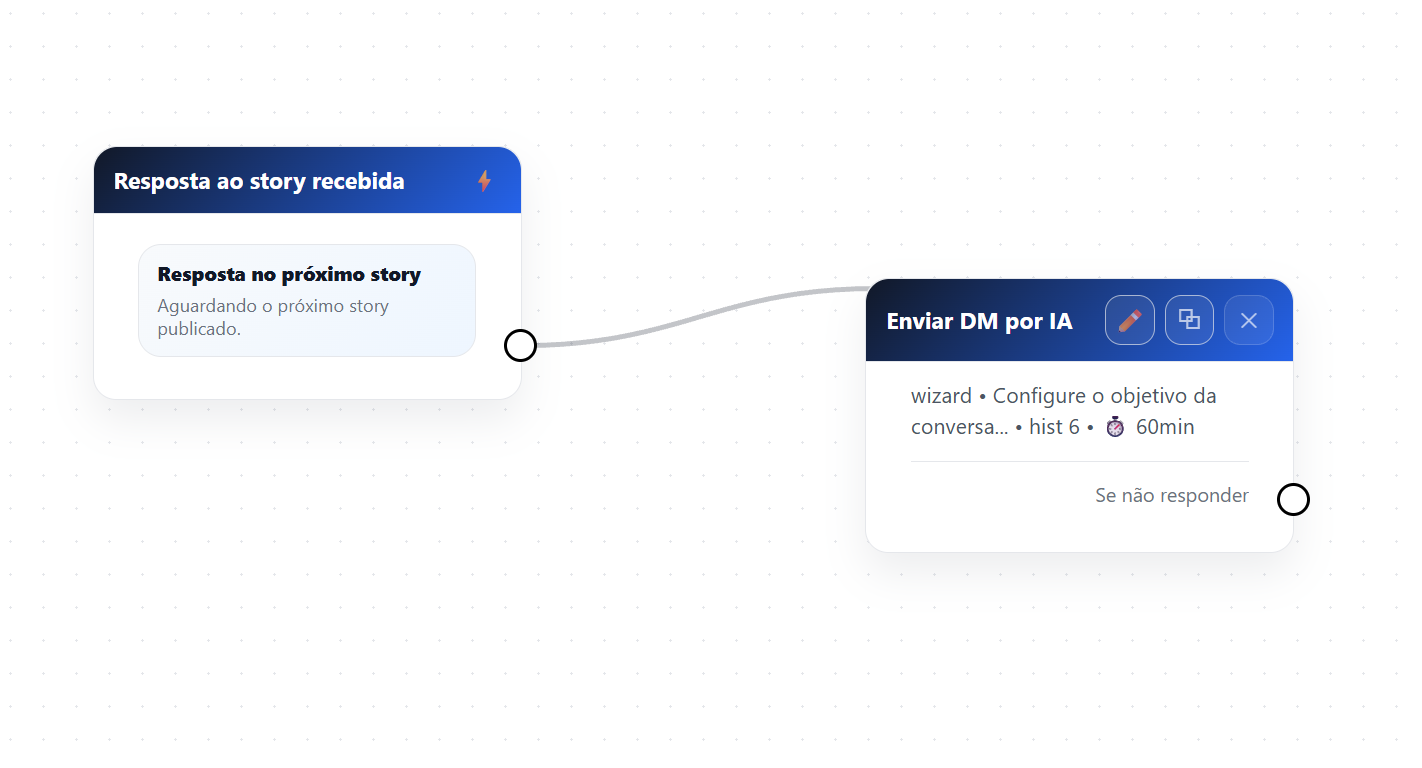
- Continue building the flow. After the first message, connect the remaining steps needed to complete the automation. Depending on the structure, the flow can continue with messages, buttons, links, or other available actions. Before finishing, review the connections to make sure the contact will follow the configured journey correctly.
How it works in practice
After the automation is configured:
- Your account publishes a Story.
- A person replies to the Story.
- InfluenciMax checks the configured conditions.
- When the reply matches the automation conditions, the flow starts.
- The person receives the configured Direct Message.
- The interaction continues through the remaining flow steps.
This way, replies received on Stories can automatically be directed into a journey inside InfluenciMax.
Screenshots
The screenshots in this tutorial are placed alongside the corresponding steps to show the trigger configuration and how the flow continues.
If something does not work
The Story reply did not start the automation
- Check whether the automation is active.
- Confirm that the correct Instagram account is connected.
- Confirm that Story Reply is configured as the trigger.
- Check whether the Story used matches the defined configuration.
- Confirm that the received reply meets the configured conditions and keywords.
The keyword was not recognized
Review the words configured in the trigger and confirm that the submitted reply matches the defined conditions. Also check whether a negative keyword is interfering with the trigger.
The message did not arrive in Direct Messages
Confirm that a message action is connected after the Story Reply trigger and review the connections between the steps.
The flow started but did not continue
Review the connections between the blocks and confirm that all required steps are correctly connected.
Expected result
With the Story Reply automation configured, replies received on Stories can automatically start a flow when they meet the defined conditions.
From there, InfluenciMax can continue the interaction through Direct Messages and execute the remaining actions configured in the automation.