

Overview
The InfluenciMax Dashboard brings important information about your operation together in one place. From it, you can monitor account indicators, analyze interactions, and access information related to the service provided by your team.
The goal is to make it easier to read the main operational data without having to check each area of the platform separately.
Video tutorial
Before you start
Before analyzing the data:
- confirm that you are viewing the correct account;
- check that the account is properly connected to InfluenciMax;
- consider the period used in the indicators;
- remember that the displayed results depend on the activities recorded for the account.
Step by step
1. Access the Dashboard
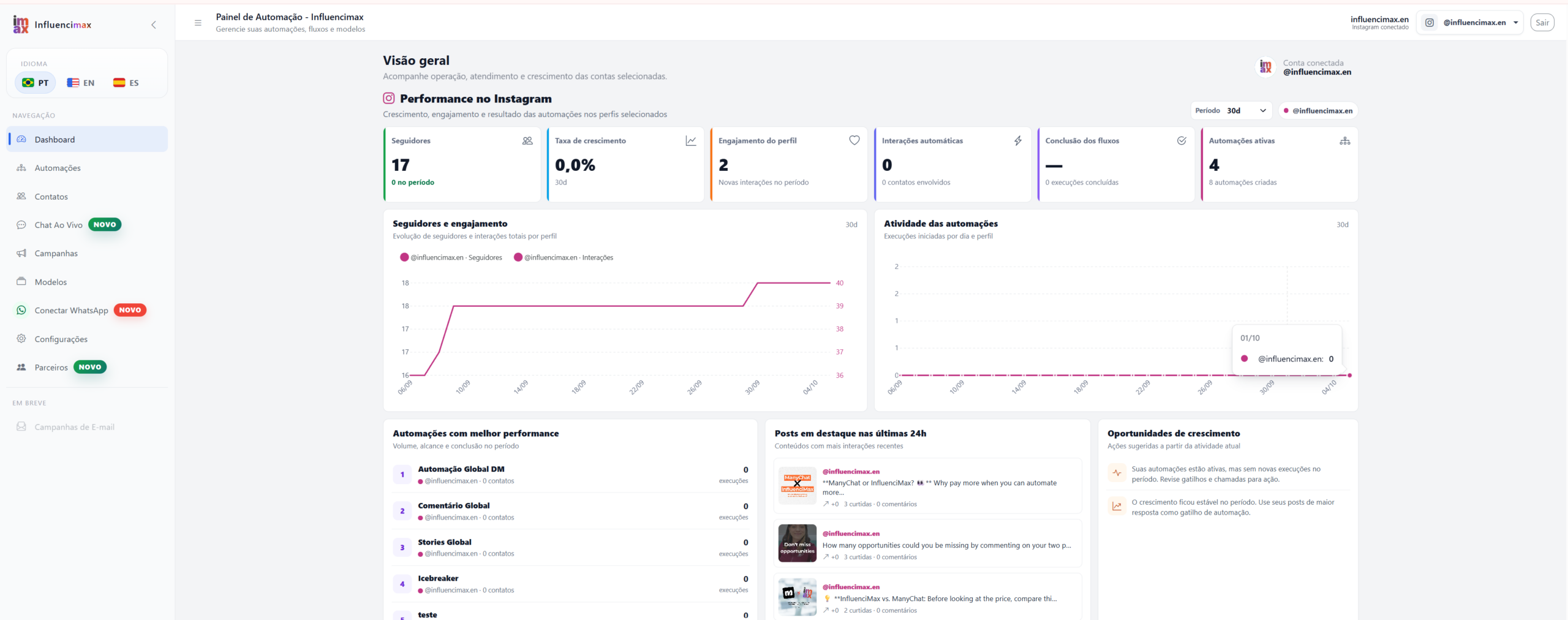
After logging in to InfluenciMax, open the Dashboard from the main menu.
In this area, you will find the available indicators to monitor the operation and quickly identify information that requires attention.
2. Analyze the account overview
Start by reviewing the general indicators shown on the Dashboard.
They provide a quick view of account activity and help identify changes in performance over time.
Avoid evaluating a single number in isolation. Looking at the indicators together provides a more complete view of what is happening in the operation.
3. Analyze interactions and performance
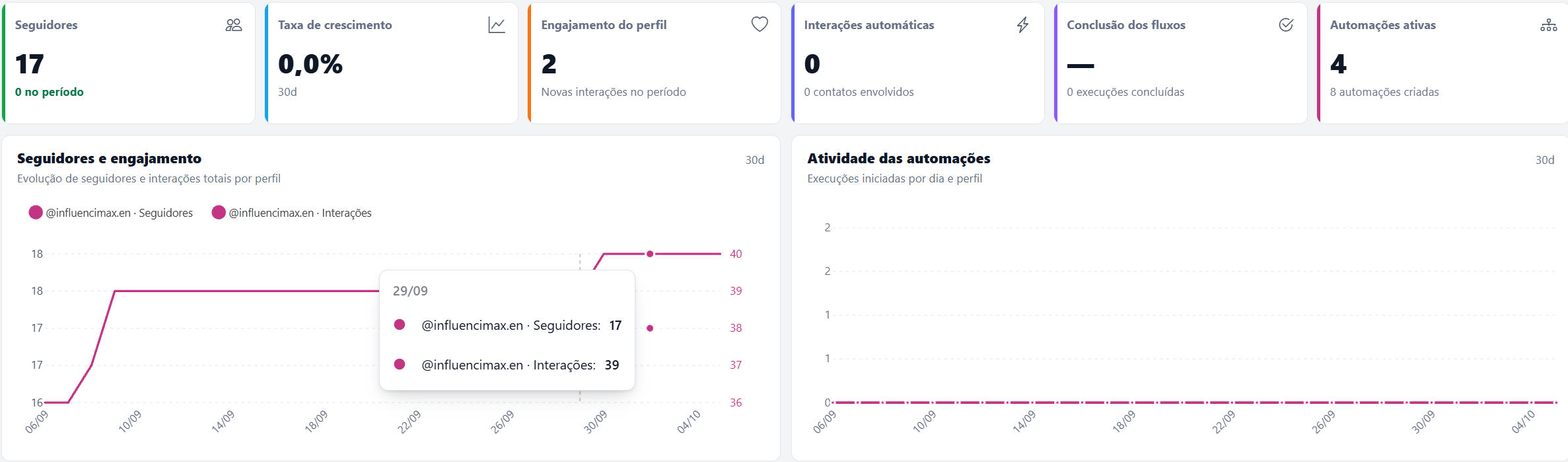
Interaction data helps you understand the volume of activity generated by your audience and connected channels.
Use this information to compare periods and identify relevant changes in contact behavior.
When there is a significant variation, also consider the actions performed during that period, such as posts, campaigns, and automations.
4. Monitor the Service Center
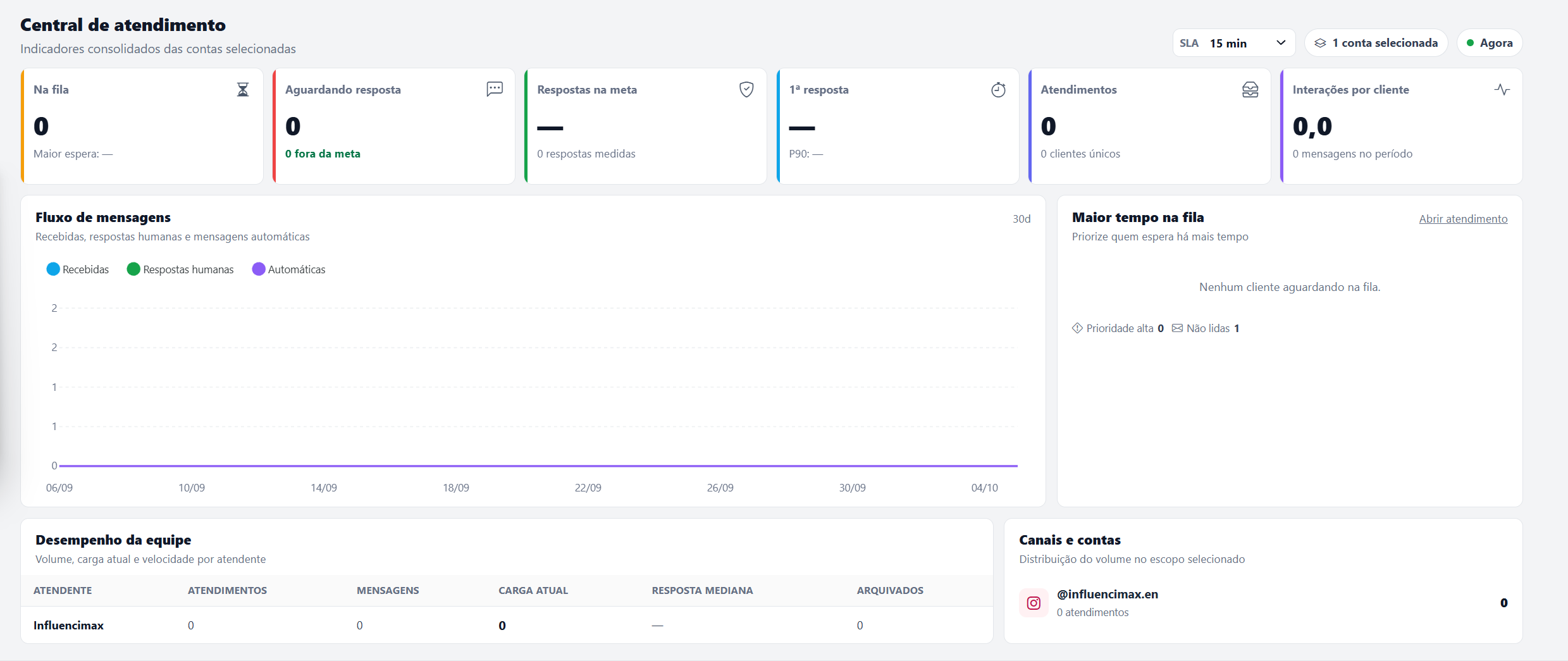
In addition to the general indicators, InfluenciMax includes a Service Center designed to monitor customer service operations.
There, you can view consolidated indicators for the selected accounts and follow important information about conversations and team performance.
Available information includes:
- number of conversations in the queue;
- conversations awaiting a response;
- responses within the defined target;
- first response time;
- number of service interactions;
- average interactions per customer;
- flow of received messages, human replies, and automated messages;
- customers with the longest queue time;
- individual team performance;
- distribution of service interactions across channels and accounts.
At the top of the Service Center, you can also consider the service SLA and the accounts selected for analysis.
These indicators help identify queues, delays, and service volume while providing a clearer view of team speed and workload.
5. Interpret the data together
The indicators should be analyzed together.
An increase in message volume, for example, may represent greater audience activity, but it can also increase the number of people waiting for service.
Likewise, monitoring first response time and queued conversations helps identify whether the team is keeping up with demand at the expected pace.
The goal is not only to observe numbers, but to use them to identify areas that require attention.
6. Monitor indicators regularly
Review the indicators regularly and compare periods to establish a performance reference for the operation.
For the Service Center, pay particular attention to:
- queue growth;
- conversations awaiting a response;
- first response time;
- compliance with the service target;
- team workload;
- message and service volume.
When an indicator shows a relevant change, use the other InfluenciMax areas to investigate what is happening.
Screenshots
The screenshots above show the Dashboard overview, interaction and performance indicators, and the Service Center. Use each screen as a reference while analyzing your operation.
If something does not work
If the expected data does not appear:
- confirm that the correct account is selected;
- check that the account connection is active;
- verify whether there was activity during the analyzed period;
- confirm the accounts selected in the Service Center;
- refresh the page and check the indicators again;
- if the issue continues, contact InfluenciMax support.
Expected result
By using the Dashboard and Service Center, you will have a more complete view of your InfluenciMax operation and will be able to monitor indicators, interactions, message volume, queues, and team performance in one place.