

Overview
The InfluenciMax Expert Plan was developed for companies, content creators, and professionals who want to scale their operations with advanced automations, Artificial Intelligence, and complete lead capture and qualification strategies.
With access to up to 40 automations, unlimited global automations, advanced validations, and complete data collection, the Expert Plan provides all the resources needed to create smarter and more efficient automated journeys.
When you subscribe, your current plan will be automatically replaced by the Expert Plan. When applicable, the upgrade will be charged proportionally to the remaining period of the subscription.
Video tutorial
There is no video tutorial available for this article yet.
Before you start
Before using the Expert Plan features, check whether your Instagram account is correctly connected to InfluenciMax.
It is also recommended to review your current automations to identify improvement opportunities using advanced features such as follower validation, saved contact condition, and global automations.
Step by step
Understanding the available features
When you activate the Expert Plan, you will have access to the following features:
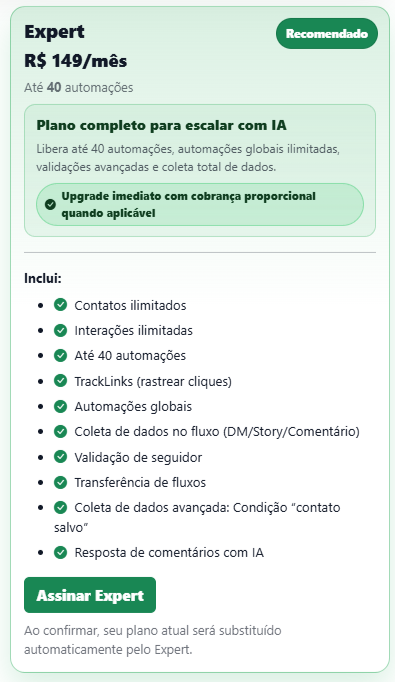
- Unlimited contacts.
- Unlimited interactions.
- Up to 40 active automations.
- TrackLinks for click tracking.
- Unlimited global automations.
- Data collection in DM, Stories, and Comments flows.
- Follower validation.
- Flow transfer.
- “Saved Contact” condition.
- Automatic comment replies with Artificial Intelligence.
Creating multiple advanced automations
With the limit of up to 40 automations, you can create specific flows for different campaigns, products, audiences, and objectives.
This allows you to segment strategies without compromising the organization of your automations.
Using follower validation
Follower validation allows you to automatically check whether the user follows your profile before moving forward in certain steps of the flow.
This feature is useful for exclusive campaigns, benefit distribution, and audience growth strategies.
Capturing complete lead data
The Expert Plan allows you to collect important information directly within automated conversations, such as:
- Name.
- Email.
- Phone.
- Other custom information configured in the flow.
This data can be used for segmentation, future campaigns, and sales processes.
Using the “Saved Contact” condition
The “Saved Contact” condition allows you to create smarter flows by checking whether the user already has information registered in the platform.
This lets you personalize the lead experience, avoid repeated questions, and create more efficient journeys.
Configuring global automations
Global automations allow you to create automatic replies that work across your entire account.
Because there is no limit for this feature in the Expert Plan, you can structure different support scenarios without depending on specific campaigns.
Transferring flows between accounts
The flow transfer feature makes it easier to replicate automations between different accounts and projects.
This reduces setup time and allows you to standardize strategies across multiple profiles.
Tracking results with TrackLinks
TrackLinks allow you to monitor the performance of links sent by automations.
With them, you can identify which campaigns generate more clicks and which strategies perform better.
Automating comments with Artificial Intelligence
AI can automatically reply to comments received on your posts.
In addition to increasing response speed, this feature helps expand engagement and improve the user experience.
If something does not work
I cannot create new automations
Check whether the limit of 40 automations has already been reached. If needed, remove old automations or review which flows should remain active.
Follower validation is not working
Confirm whether the condition was configured correctly inside the flow and whether it is positioned in the desired step of the automation.
Lead data is not being captured
Check whether the collection questions are configured correctly and linked to the appropriate variables inside the flow.
The “Saved Contact” condition is not recognizing users
Make sure the data was captured previously and that the flow is using the correct condition to perform the validation.
Link clicks do not appear in the reports
Check whether the links sent were created using the platform’s TrackLinks feature.
Expected result
With the Expert Plan, you will have access to the complete InfluenciMax experience, allowing you to create up to 40 automations, capture advanced data, validate followers, use unlimited global automations, track results through TrackLinks, and automate interactions with Artificial Intelligence, creating scalable and highly efficient operations for lead generation and sales.